Joining and Leaving Rooms
In this lesson, we will take a look at how we can add multiple rooms in our chat app, each with their own set of users and messages.
Nest
On the server-side, we need to store the list of current rooms and let the clients join and leave rooms.
ChatService
Add Interfaces
To kick it off, we need a couple of data structures. We'll create ChatService
and Message interfaces. The Message will represent a single chat message
and have the user and the content of the message as values.
ChatRoom will hold the users and messages currently in a chat room.
export interface Message {
  user: string;
  content: string;
}

export interface ChatRoom {
  users: string[];
  messages: Message[];
}
We could put these interfaces in their file, but I choose to keep them in the service for simplicity.
Store ChatRoom Data
We'll use a JavaScript object to store the chat room data. The key will be the
chat room's name, and the value will be a ChatRoom. Add the chatRooms
variable directly below the users variable:
export class ChatService {
  users: Record<string, string> = {};
  chatRooms: Record<string, ChatRoom> = {
    General: { users: [], messages: [] },
    Angular: { users: [], messages: [] },
    NestJS: { users: [], messages: [] },
  };

  //omitted for brevity
}
Add Methods to Join and Leave Rooms
Next, we'll add several methods to the ChatService class. These methods will
control users joining and leaving rooms by modifying the chatRooms users
array.
joinRoom(room: string, user: string) {
  this.chatRooms[room].users.push(user);
  // sort the users alphabetically
  this.chatRooms[room].users.sort((a, b) => {
    return a.toLowerCase() >= b.toLowerCase() ? 1 : -1;
  });
}

leaveRoom(room: string, user: string) {
  this.chatRooms[room].users = this.chatRooms[room].users.filter(
    (u) => u !== user,
  );
}
Add Methods to Get Rooms
Next, we'll add a couple of methods that the gateway will need to pull back an individual chat room as well as a list of all the available rooms:
getChatRoom(room: string) {
  return this.chatRooms[room];
}

getChatRooms() {
  const keys = Object.keys(this.chatRooms);
  return keys;
}
Remove User From Room Upon Disconnection
The last thing we need to update here in the service is to remove a user from a
chat room when they disconnect. Update the disconnect method with the
following highlighted lines:
disconnect(clientId: string) {
  const users = Object.keys(this.users);
  let userToRemove = '';
  users.forEach((user) => {
    if (this.users[user] === clientId) {
      userToRemove = user;
      return;
    }
  });
  if (userToRemove) {
    delete this.users[userToRemove];
    // remove user from any joined rooms
    const rooms = Object.keys(this.chatRooms);
    rooms.forEach((room) => {
      this.leaveRoom(room, userToRemove);
    });
  }
  return userToRemove;
}
In the snippet above, we loop through each of the rooms and remove the user if needed.
ChatGateway
Pass Back a List of Rooms Upon identifying
After the client identifies, that's a good time to give them any information they
need. In our case, they will need a list of all the possible rooms. In the
handleIdentify method, return the rooms:
@SubscribeMessage('identify')
async handleIdentify(client: Socket, user: string) {
  this.chatService.identify(user, client.id);
  return this.chatService.getChatRooms();
}
Add Handlers to Join and Leave Rooms
The handleJoinRoom and handleLeaveRoom are events the client will raise as
they move between rooms client side:
@SubscribeMessage('joinRoom')
handleJoinRoom(client: Socket, data: { user: string; room: string }) {
  this.chatService.joinRoom(data.room, data.user);
  client.join(data.room);
  client.to(data.room).emit('userJoined', data.user);
  return this.chatService.getChatRoom(data.room);
}

@SubscribeMessage('leaveRoom')
handleLeaveRoom(client: Socket, data: { user: string; room: string }) {
  this.chatService.leaveRoom(data.room, data.user);
  client.leave(data.room);
  client.to(data.room).emit('userLeft', data.user);
}
Here we are using a few new APIs we haven't seen yet.
Socket.IO has the concept of rooms that clients can join. Rooms are used to broadcast events to a subset of clients. We'll use rooms to send messages to particular chat rooms.
To join a client into a room, you use client.join and pass in the room's name. Events can be sent to that room by specifying the room name in the to
method before emitting the event like so:
client.to(data.room).emit('userJoined', data.user);
For more info, see the Socket.IO docs on Joining and Leaving rooms.
Broadcast Event When User Disconnects
When a user disconnects, we'll broadcast an event that they left the room.
Update the handleDisconnect method to emit a userLeft event and pass in the
user name returned from disconnecting the client in the service:
@SubscribeMessage('disconnect')
async handleDisconnect(client: Socket) {
  const user = this.chatService.disconnect(client.id);
  client.broadcast.emit('userLeft', user);
}
Angular
On the client, the user will join and leave rooms using the UI to navigate around.
ChatService
Add Interfaces
We'll duplicate the Message and ChatRoom interfaces on the server.
Add them to the top of the ChatService:
export interface Message {
  user: string;
  content: string;
}

export interface ChatRoom {
  users: string[];
  messages: Message[];
}
Update ChatAppData Interface
Now add some additional members to the ChatAppData interface:
export interface ChatAppData {
  activeRoom: string;
  chatRoom: ChatRoom;
  connected: boolean;
  rooms: string[];
  user: string;
}
Here, activeRoom will be the name of the room the user is currently in,
chatRoom will contain the ChatRoom data, and rooms will be a list of all
the available rooms.
Add New Observables
Add some new observables to store the state of the new values:
export class ChatService {
  private url = 'http://localhost:3000/chat';
  private client: Socket;
  private connected$ = new BehaviorSubject(false);
  private user$ = new BehaviorSubject('');
  private activeRoom$ = new BehaviorSubject('General');
  private chatRoom$ = new BehaviorSubject<ChatRoom>({
    users: [],
    messages: [],
  });
  private rooms$ = new BehaviorSubject<string[]>([]);

  //omitted for brevity
}
Return New Data to Component
Update getChatAppData to include new members:
getChatAppData(): Observable<ChatAppData> {
  const data = combineLatest([
    this.activeRoom$,
    this.chatRoom$,
    this.connected$,
    this.rooms$,
    this.user$,
  ]).pipe(
    map((value) => {
      const [activeRoom, chatRoom, connected, rooms, user] = value;
      return {
        activeRoom,
        chatRoom,
        connected,
        rooms,
        user,
      };
    })
  );
  return data;
}
Get List of Rooms
The identify event now returns the list of rooms when called. Add a
callback to the method to store the rooms in the observable:
this.client.on('connect', () => {
  this.client.emit('identify', this.user$.value, (rooms: string[]) => {
    this.rooms$.next(rooms);
  });
  this.connected$.next(true);
});
Add New Event Listeners
The server will broadcast new userJoined and userLeft events for other
users. Add these new event handlers after the existing ones inside the
ChatService constructor:
this.client.on('userJoined', (user: string) => {
  const chatRoom = this.chatRoom$.value;
  if (chatRoom) {
    chatRoom.users.push(user);
    // Sort the users alphabetically
    chatRoom.users.sort((a, b) => {
      return a.toLowerCase() >= b.toLowerCase() ? 1 : -1;
    });
    this.chatRoom$.next(chatRoom);
  }
});
this.client.on('userLeft', (user: string) => {
  const chatRoom = this.chatRoom$.value;
  if (chatRoom) {
    chatRoom.users = chatRoom.users.filter((u) => u !== user);
    this.chatRoom$.next(chatRoom);
  }
});
Add Methods to Join and Leave Rooms
Add methods to send events to the server when the current user joins and
leaves rooms. The switchRoom method will be called from the app component and
have the user leave their current room, then join the new room. The
activeRoom$ observable is used to retrieve the current room to leave and then
set to the new room once done.
private joinRoom(room: string) {
  this.client.emit(
    'joinRoom',
    { user: this.user$.value, room },
    (chatRoom: ChatRoom) => {
      this.chatRoom$.next(chatRoom);
    }
  );
}

private leaveRoom(room: string) {
  this.client.emit('leaveRoom', { user: this.user$.value, room });
}

switchRoom(room: string) {
  const activeRoom = this.activeRoom$.value;
  this.leaveRoom(activeRoom);
  this.joinRoom(room);
  this.activeRoom$.next(room);
}
Join Room Upon Connection
When the user connects, they will join their current active room. Update the
connect method to call joinRoom:
connect(user: string) {
  if (this.client.connected) {
    return;
  }
  localStorage.setItem('user', user);
  this.user$.next(user);
  this.client.connect();
  this.joinRoom(this.activeRoom$.value);
}
Leave Room Upon Disconnection
When the user disconnects by using the disconnect button, we will have them
leave their current room. Update the disconnect method to call leaveRoom:
disconnect() {
  localStorage.removeItem('user');
  this.leaveRoom(this.activeRoom$.value);
  this.client.disconnect();
  this.user$.next('');
}
AppComponent
Add Method to Switch Rooms
In the app component, add the switchRoom method, which will call into the
ChatService:
switchRoom(room: string) {
  this.chatService.switchRoom(room);
}
AppComponent Template
Update Rooms Lists
Around line 7 in the template, switch out the hard-coded list of rooms with one that will now display the real list:
Replace:
<ul>
  <li class="active">General</li>
</ul>
With:
<ul>
  <li
    [ngClass]="{ active: data.activeRoom === room }"
    (click)="switchRoom(room)"
    *ngFor="let room of data.rooms"
  >
    {{ room }}
  </li>
</ul>
We add an 'active' CSS class to the currently active room to indicate the room the user is currently in.
Update Users Lists
Around line 20, update the users list to use real data:
Replace:
<ul>
  <li>User</li>
</ul>
With:
<ul>
  <li *ngFor="let user of data.chatRoom.users">{{ user }}</li>
</ul>
Update Welcome Section with Real Room Name
Around line 30, update the welcome message to display the name of the active room:
<div class="user">Welcome {{ user }}, Room {{ data.activeRoom }}</div>
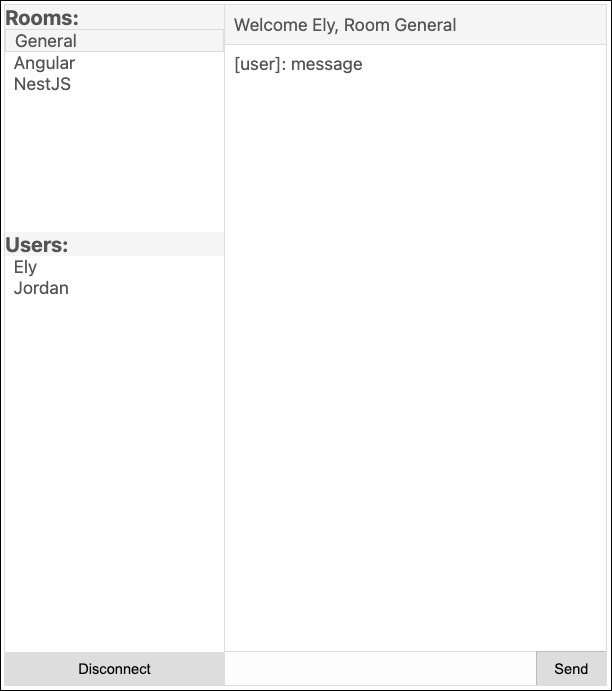
Visit the app and see that you can now join rooms and, if you open another browser (must be a different browser vendor like FireFox, Edge, etc.. so the local storage values don't get mixed up), you can see the users list update in realtime:
Next up, sending and receiving messages!